
How to Improve Laser Marking Speed Without Sacrificing Marking Quality
In industrial manufacturing, the speed of laser marking directly affects production efficiency and the production cycle. However, simply increasing the speed does not necessarily lead to an improvement in efficiency. If the laser moves too fast or the parameters are improperly set, it may result in shallow, uneven, incomplete or illegible marking.
Therefore, the goal is not to pursue the highest speed, but to find the fastest and most stable marking speed while meeting the quality requirements.
So, how can the laser marking speed be increased without sacrificing the marking quality?
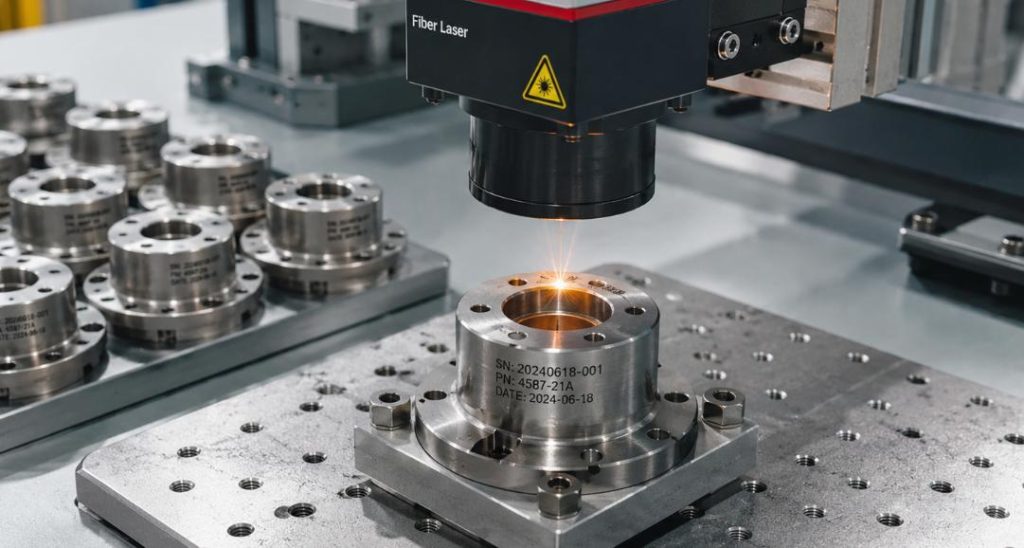
What Determines Laser Marking Speed?
The speed of laser marking is not only determined by the laser marking machine speed setting, but also affected by laser parameters, material properties, and marking design. The actual marking time and effect will vary accordingly.
Laser power determines the energy applied to the material. Higher power typically supports a faster marking speed, especially for applications such as deep engraving, but excessive power may cause overheating, burning, or surface damage.
Parameters such as frequency, pulse setting, scan spacing, and scan count also influence the marking speed and quality.
The material and its surface condition are equally important. Stainless steel, aluminum, coated metals, and plastics respond differently to laser energy, so parameters need to be adjusted according to the material.
In addition, the marking design also affects the cycle time. Large-area filling, complex graphics, and unnecessary scan paths will increase the marking time for a single part.
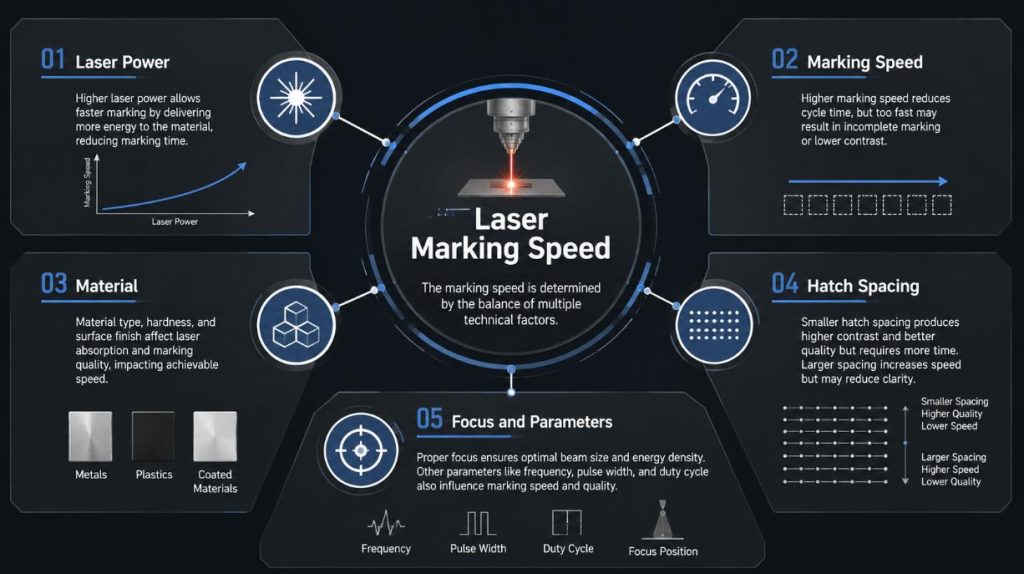
5 Ways to Increase Laser Marking Speed
Increasing the speed of laser marking does not always mean simply raising the speed setting. A more effective approach is to optimize the entire marking process, including laser power, scanning path, focusing, and the selection of the laser source. The following five practical methods can enhance production efficiency while maintaining the quality of marking.
Optimize Laser Power and Marking Speed Together
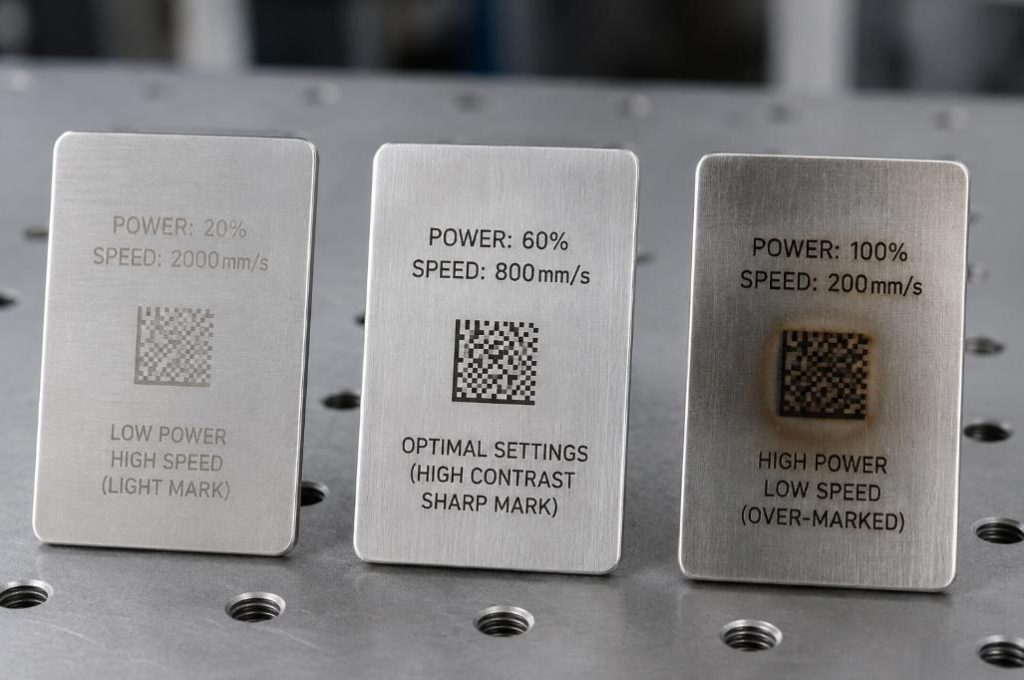
Laser power and marking speed need to be balanced. The faster the laser moves, the less energy is delivered to each area of the material. If the power is not adjusted accordingly, the marking may be too shallow or insufficient in depth.
Rather than simply increasing the speed, it is better to test different combinations of power and speed to find the most effective setting.
A good principle is: higher speed may require higher power, but the ideal combination depends on the material, marking depth, and the required contrast.
For deep engraving or large-scale metal marking applications, using a higher-power fiber laser can help manufacturers achieve the desired effect at a faster speed.
Optimize Hatch Spacing
For filling in logos, text and graphics, the scanning interval directly affects the marking time.
If the scanning lines are too dense, it will increase the number of laser scans and cycle time, but it may not necessarily improve the marking effect. If the interval is too large, it may cause gaps or result in uneven surfaces.
Therefore, a practical scanning interval that is as wide as possible should be selected while meeting the marking quality requirements.
Before increasing the maximum speed of the laser, first check whether the current scanning interval has caused unnecessary scanning time.
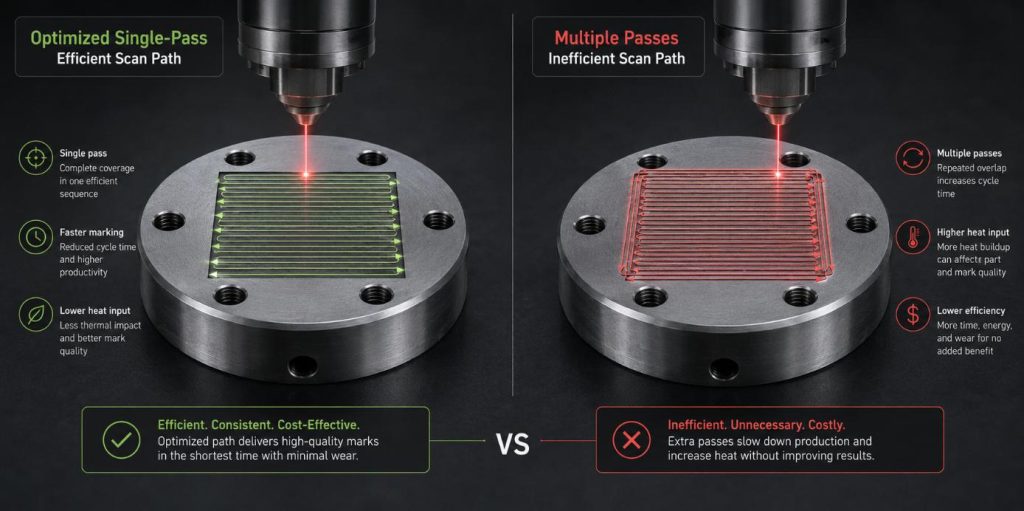
Reduce Unnecessary Passes
Multiple scans are suitable for deep engraving or specific surface effects, but more scans do not necessarily mean better results.
If a smaller number of scans can achieve the required depth or contrast, reducing the number of scans can directly shorten the marking cycle.
At the same time, the marking file should be checked. Repeated contours, overlapping lines, and complex graphics may cause the laser to scan repeatedly, but they hardly improve the final effect.
Therefore, before adjusting the machine parameters, the marking path should be optimized first.
A more concise marking file can increase production efficiency without replacing the laser hardware.
Use the Correct Focus and Parameters
Correct focus is the foundation of efficient laser marking. When the workpiece deviates from the optimal focal point, the laser spot will become larger, the energy density will decrease, resulting in blurred marking, insufficient intensity or inconsistency.
Operators may compensate by reducing the speed or increasing the power, but this will reduce the overall efficiency.
To maintain stable marking quality, the workpiece should be placed correctly and the following key parameters should be tested:
- Marking speed
- Laser power Frequency
- Pulse setting
- Focal position
The optimal parameters should be determined based on the specific material and marking requirements, rather than being applied with a fixed set of parameters.
Choose the Right Laser Source and Power
Sometimes, the most effective way to increase marking speed is not to optimize the existing parameters, but to choose a laser source that is more suitable for the application scenario.
For example, fiber lasers are widely used for metal marking, while MOPA fiber lasers can provide greater flexibility for certain fine marking and surface coloring applications. Ultraviolet lasers and carbon dioxide lasers may be more suitable for certain non-metallic materials.
Laser power is also crucial. Low-power systems may be suitable for simple surface marking, while high-power systems are more suitable for deep engraving or mass production.
When choosing a laser, in addition to the highest speed, factors such as the material, marking depth, contrast, marking area, and required output should also be considered comprehensively.
The appropriate laser source and power can significantly improve production efficiency while maintaining stable and repeatable marking quality.
Speed vs. Quality: Find the Right Balance
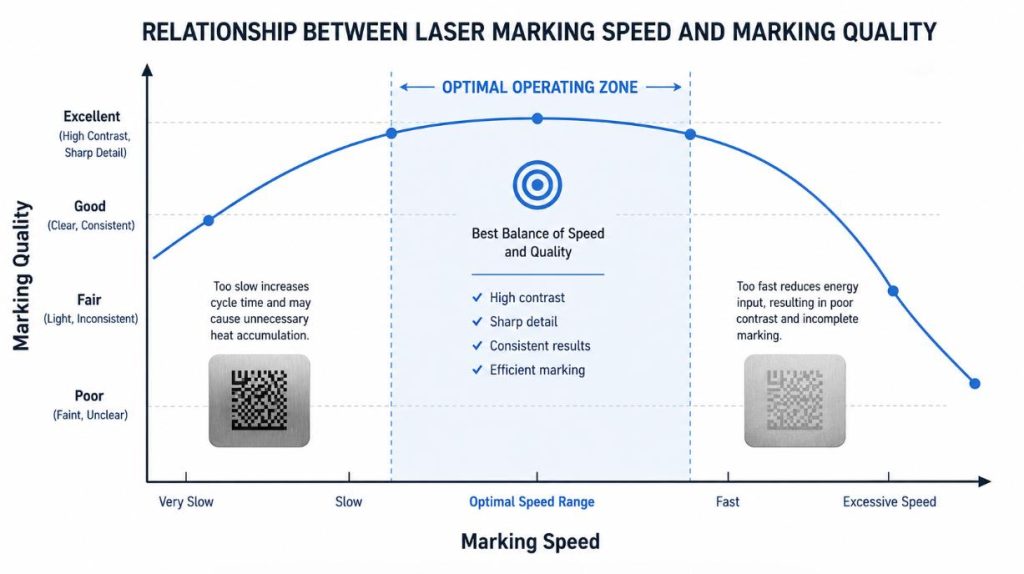
A balance needs to be maintained between marking speed and quality.
If the speed is too fast, the laser may not be able to provide sufficient energy, resulting in a shallow or uneven mark. If the speed is too slow, it will increase the cycle time, but it may not significantly improve the quality.
Therefore, the optimal production parameters are not the highest speed or the highest power, but the fastest parameter combination that can stably complete qualified marks while meeting the quality requirements.
For industrial production, stable and consistent mark quality is just as important as the effect of a single mark.
How to Find the Best Marking Parameters
The most reliable way to determine the appropriate parameters is to conduct sample tests.
First, clearly define the quality requirements, including:
- Mark contrast
- Mark depth
- Readability of characters or barcodes
- Surface appearance
- Production cycle time
Then test different combinations of speed and power, record the results, and compare the mark quality with the cycle time.
For example, tests can be conducted at low speed, medium speed, and high speed, and the laser power can be adjusted accordingly. The optimal settings should ensure stable and repeatable marks while meeting the production cycle requirements.
There are no universal laser marking parameters that apply to all materials and applications. Therefore, sample testing is an important step before mass production.
Final Thought
Increasing the speed of laser marking is not just about adjusting the speed settings. Factors such as laser power, scanning interval, scanning frequency, focal length, laser parameters, laser source, and marking design all affect the cycle time and marking quality.
The key is to comprehensively optimize these factors, finding the fastest and most stable production parameters while meeting the quality requirements.
If you wish to enhance the marking efficiency or select an appropriate laser marking solution, ZIXU Marking can provide sample testing and customized technical advice based on the material, marking requirements, and production needs.